The most interesting thing about AI in Home Assistant is not that it can toggle a light. Home Assistant has always done that well.
The real shift is operational: large, old, slightly chaotic installations can finally be refactored without feeling like a second job. Naming cleanup, dashboard restructuring, automation rewrites, stale-entity audits — all the maintenance work that usually gets postponed.
That potential is real. So is the risk.
The difference between “massive unlock” and “painful rollback” is not model IQ. It is change discipline.
Start with the right mental model
First, separate two things that are often mixed together:
- Home Assistant’s official
mcp_serverintegration (entity control focus) - the
ha-mcpproject (broader admin/configuration tooling)
Both can be useful, but they are not interchangeable. If you do not know which one your assistant is using, you cannot reason clearly about capability, risk, or permissions.
Why this works so well in practice
Most Home Assistant maintenance is structured but tedious:
- repetitive YAML edits
- entity naming normalization
- card/layout iteration
- brittle cross-file references
- low-value cleanup tasks
LLMs are strong at this class of work: they are fast, patient, and consistent across repetition. In other words, they are good at the parts humans delay.
Where people get into trouble is letting that speed bypass operational safeguards.
The operator protocol (minimum viable safety)
If you only keep one section from this article, keep this one.
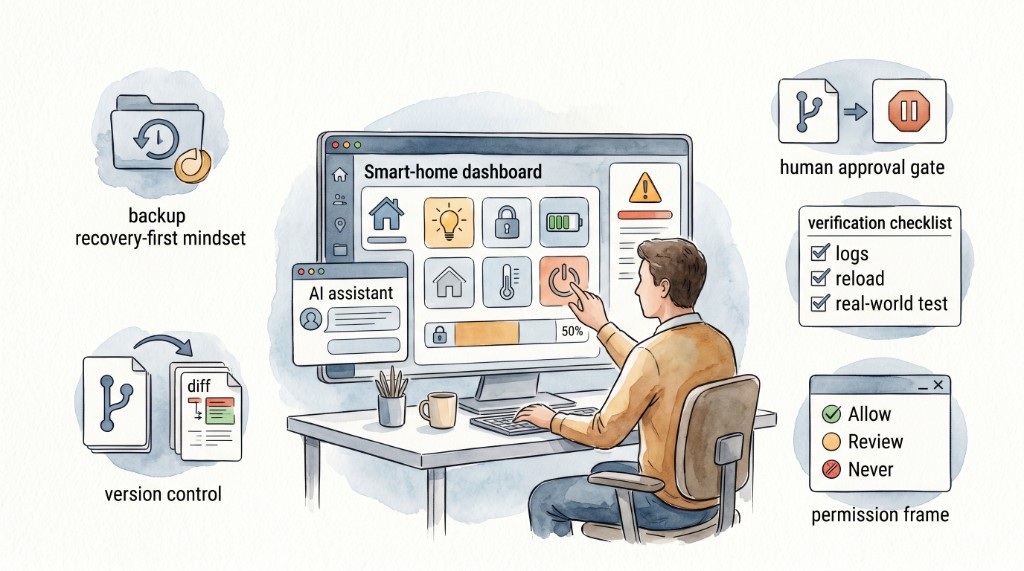
1. Backup before every write session
- create a fresh backup before any destructive or bulk edit
- keep at least one backup outside the agent’s writable scope
- verify restore path occasionally (not just backup creation)
Home Assistant’s backup tooling is mature. Use it as a precondition, not as an afterthought.
2. Run atomic changes, never one-shot rewrites
Avoid prompts like “redo my whole dashboard.”
Instead:
- one card
- one automation
- one script family
- one naming domain at a time
Small change sets reduce blast radius and make review actually possible.
3. Put configuration under Git and branch by task
- local repo for config
- one branch per change
- human diff review before merge
- no direct agent writes to production branch
This is basic software hygiene, but in home automation it is often skipped until the first incident.
4. Apply least-privilege access to the agent
- restrict writable directories
- scope available tools
- avoid blanket delete rights
- if your tooling allows it, whitelist critical entities and deny everything else
Agent capability should match task scope, not your full infrastructure surface.
5. Enforce a human approval gate
Agent proposes. Human approves. Then apply.
This is especially important for:
- safety-relevant automations
- locks, garage, alarms, climate control
- energy systems (solar/battery logic)
- any change touching many entities
6. Validate behavior after every merge
At minimum:
- configuration check
- targeted reload/restart
- log review
- one real functional test for the intended scenario
“No errors in chat” is not validation.
Hosted vs local models: choose by outcome, not ideology
Today, hosted frontier models often outperform local models on complex tool-using tasks. That may change quickly. Treat model selection as an engineering parameter:
- test with your real workloads
- measure correction rate and loop failures
- track cost per successful change
Do not optimize for benchmark screenshots. Optimize for stable operations in your own system.
A practical rollout plan (two weeks)
Week 1: low-risk wins
- naming consistency cleanup
- read-only system inventory
- dashboard card tweaks (non-critical views)
Week 2: controlled automation edits
- one automation class at a time
- branch + review + backup each session
- post-change verification checklist
By the end of two weeks you should know whether your setup is genuinely faster and safer.
What “good” looks like after adoption
A healthy AI-assisted Home Assistant workflow shows these signs:
- fewer postponed maintenance tasks
- faster turnaround on small improvements
- no large unreviewed edits
- predictable rollback path
- operator confidence increasing, not decreasing
If you gain speed but lose trust in your own system, your process is wrong.
Bottom line
AI + Home Assistant is not magic, and it is not hype either. It is high-leverage change management with a fast assistant attached.
Run it like operations: backup-first, atomic scope, least privilege, human approval, and explicit validation.
Do that, and the maintenance burden drops sharply without sacrificing reliability. Skip it, and you eventually trade convenience for restore work.
References
ha-mcpproject and docs: https://github.com/homeassistant-ai/ha-mcp- Home Assistant official MCP Server integration: https://www.home-assistant.io/integrations/mcp_server/
- Home Assistant common tasks (backups/restore): https://www.home-assistant.io/common-tasks/general/
- Nabu Casa restore/migration guide (Home Assistant Green): https://green.home-assistant.io/guides/restore-backup/
- OWASP Top 10 for LLM Applications: https://owasp.org/www-project-top-10-for-large-language-model-applications/